Most people who have moved to a different location have faced an annoying problem. When they are connected to their WiFi router, their phone (or any device using Google's APIs through WiFi connection) reports that they are still at their old location.
When a brand new WiFi router comes online, Google associates it's physical location with it's MAC address. But when you move your router to a different location, Google's location API still reports that you are at old location.
To reset the location, simply append _nomap to your WiFi's SSID; the connection name.
For example, if your WiFi's SSID is MyHomeNet, then rename it to MyHomeNet_nomap
Google will then reset the cached information for that particular MAC address.
Saturday, August 29, 2015


Tuesday, August 7, 2012
Raspberry Pi has finally arrived!
My Raspberry Pi has finally arrived; after being in waiting list for 8 months!
As the website said, its really slick.
Some pictures:


As the website said, its really slick.
Some pictures:


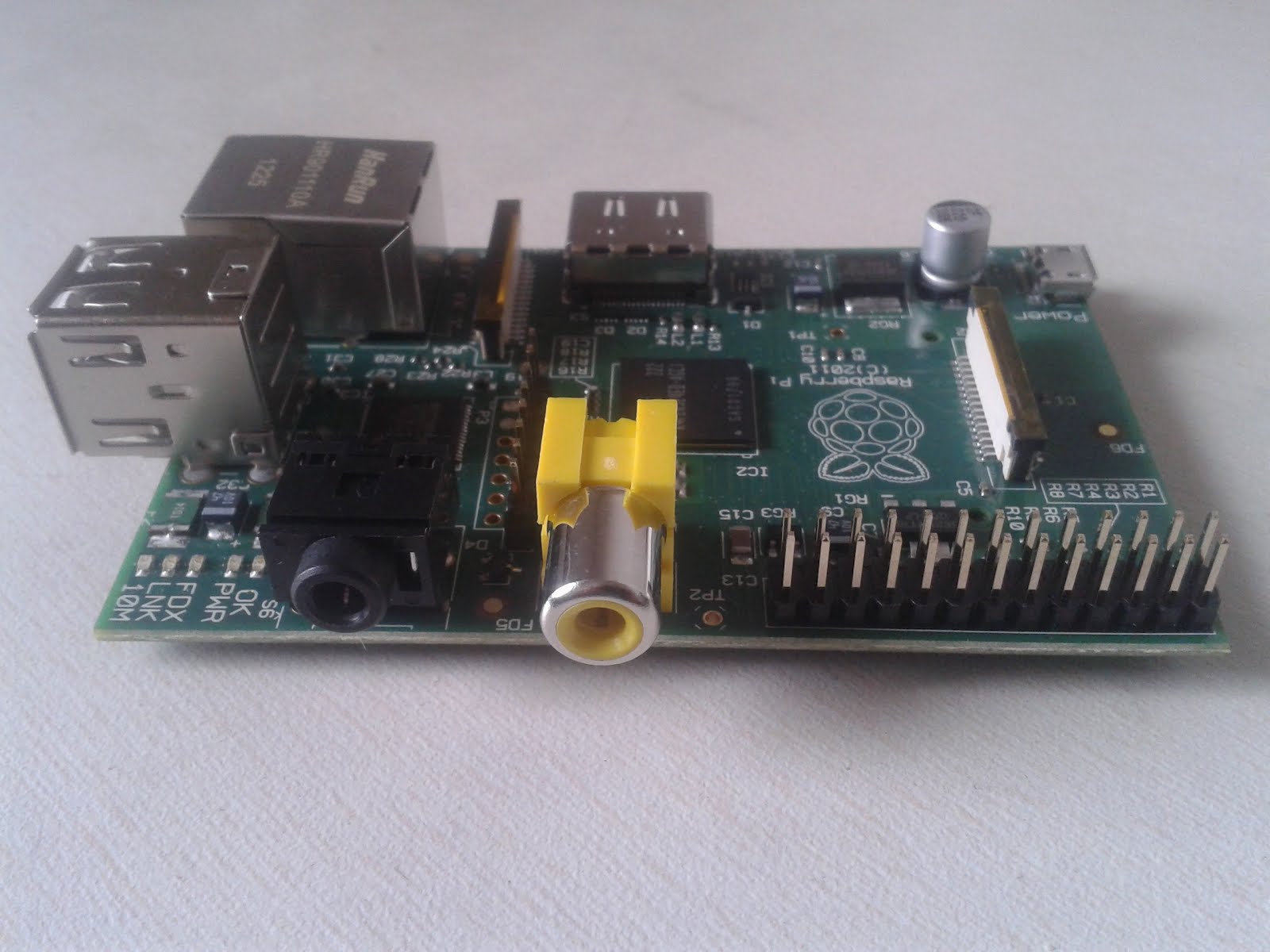
Pi running:

It was quite easy to get it up and running. Most of the Debian packages are available for ARM which is great.
Wednesday, March 10, 2010
My Grandma
 |
| Grandma |
But I love mine even more
Whenever life was difficult
She would be there for sure
She's like no other person I know
Believes in working every day
She was all fit-n-fine or so
Until a heart attack shook her day
I rushed to the hospital quickly
Which was very faraway
My heart pounded heavily
Every now and then
When I went in the ICU
She smiled and held my hand
She said I should rather study
Instead of wasting my time
She hates being in the hospital
Told me she would rather go out
Her world is not some hospital
It gives her creeps and doubts
And now that she is somewhat well
It feels like I can breath again
It all happened so fast to tell
Seems like I had a bad dream then
- Abhijeet Pathak
* Based on the real incident. My grandmother had a heart attack 3 days ago (on 7th Mar 2010).
Tuesday, February 16, 2010
My poem
Walking down a mile
He comes across a smile
Boy likes a girl
She's like a pearl
Friends they become
The blossoms have come
Very much they enjoy the time
Till now its all fun and fine
In a dream he comes to know
The feelings he had from a while ago
Love was occupying his mind
For the one and the only kind
Mind reading is not what he can do
And that his friend didn't knew
His feelings are so pure
Does she have any cure?
- Abhi
He comes across a smile
Boy likes a girl
She's like a pearl
Friends they become
The blossoms have come
Very much they enjoy the time
Till now its all fun and fine
In a dream he comes to know
The feelings he had from a while ago
Love was occupying his mind
For the one and the only kind
Mind reading is not what he can do
And that his friend didn't knew
His feelings are so pure
Does she have any cure?
- Abhi
Sunday, January 31, 2010
BareMetal OS, 64bit OS in under 64KB
Return Infinity computer software and research group has released BareMetal OS. Its a 64bit operating system entirely written in assembly language and is only 42kB in size.
Features include multi-processor and multi-core support, open source.
Features include multi-processor and multi-core support, open source.
Thursday, June 11, 2009
Get real time updates of Twitter and Flickr visually on Earth Map
flickrvision
See who is adding which photo on flickr on the map as they add it in real time.

twittervision
See the updates from twitter on the map as they are posted on the site.

See who is adding which photo on flickr on the map as they add it in real time.

twittervision
See the updates from twitter on the map as they are posted on the site.

Make USB disks/drives write protected (or read-only) using USB WriteProtector
Do you always fear that your USB drive, which contains your important data, may get affected instantly when plugged into a foreign computer in a cyber café, computer lab in your college or even at your friend's place? Then USB WriteProtector by Gaijin is for you.

This program can be downloaded from http://www.gaijin.at/en/dlusbwp.php
Moreover this program is FREE and Portable, i.e. it does not requires installation.
Extract the files from the archive and run USBWriteProtect.exe.
The default interface language is not English, so choose English from the list of available labguages and you are ready to go.
This nice little app turns On/Off the write protection flag in the file syetem of your USB drive. So if you turn write protection on, then no changes can be done to the contents of USB drive, not even viruses can infect your drive.

When ever you turn write protection on or off, you just have to remove/eject the drive and attach it again.

This program can be downloaded from http://www.gaijin.at/en/dlusbwp.php
Moreover this program is FREE and Portable, i.e. it does not requires installation.
Extract the files from the archive and run USBWriteProtect.exe.
The default interface language is not English, so choose English from the list of available labguages and you are ready to go.
This nice little app turns On/Off the write protection flag in the file syetem of your USB drive. So if you turn write protection on, then no changes can be done to the contents of USB drive, not even viruses can infect your drive.

When ever you turn write protection on or off, you just have to remove/eject the drive and attach it again.
Subscribe to:
Posts (Atom)